



Your Odoo install used to work fine, but now it’s the bane of your existence. Reports don’t look right. The inventory value doesn’t match financial data. Intercompany balances don’t reconcile. VAT and other taxes behave inconsistently. Your team keeps correcting entries manually or reentering data from finance’s Excel spreadsheets.
In SmartTek’s experience, these issues stem from improper Odoo accounting setup. Our Odoo consultants encounter these three scenarios most often:
- Incorrect configurations (e.g., chart of accounts, tax rules)
- Highly specific report needs not covered out-of-the-box
- Accounting outside Odoo, which requires integration and a clear single source of truth
Here’s good news: you don’t have to abandon Odoo because of these issues. That said, the solution depends on:
- How well Odoo accounting configuration reflects your actual business
- How prepared your teams are to make the most out of Odoo functionality
- Whether customization can enable extra deeds
What Odoo Accounting Already Handles Out of the Box
Accounting is a non-negotiable module for any business using an ERP. One report even showed it had a 100% install rate in Odoo implementations.
Odoo’s accounting engine is quite mature. For example, Odoo 19 supports these accounting capabilities out of the box, no customization necessary:
- Accounts receivable and payable (with a Partner Ledger report)
- Double-entry bookkeeping
- Accrual and cash basis accounting support
- Financial reports, including the general ledger, updated in real time
- Customer invoicing (creation, confirmation, sending)
- Payment follow-up and reconciliation
- Bank synchronization
- Manual and automated inventory valuations (Standard Price, Average Cost/AVCO, First In First Out/FIFO)
- Multi-company accounting with separate charts of accounts
- Multi-currency environments and international standards for 100+ countries
On paper, switching to an ERP and accounting software like Odoo looks great. But in reality, some companies end up struggling with incorrect reports, messy intercompany flows, and problematic costing. Others eventually have to rebuild their accounting setups.
Let’s break down why that happens.
Where Odoo Accounting Actually Gets Complicated and What to Do About It
Most accounting issues don’t happen because there’s a bug in the code. They happen because the setup, data, or architecture don’t reflect how the company operates in real life.
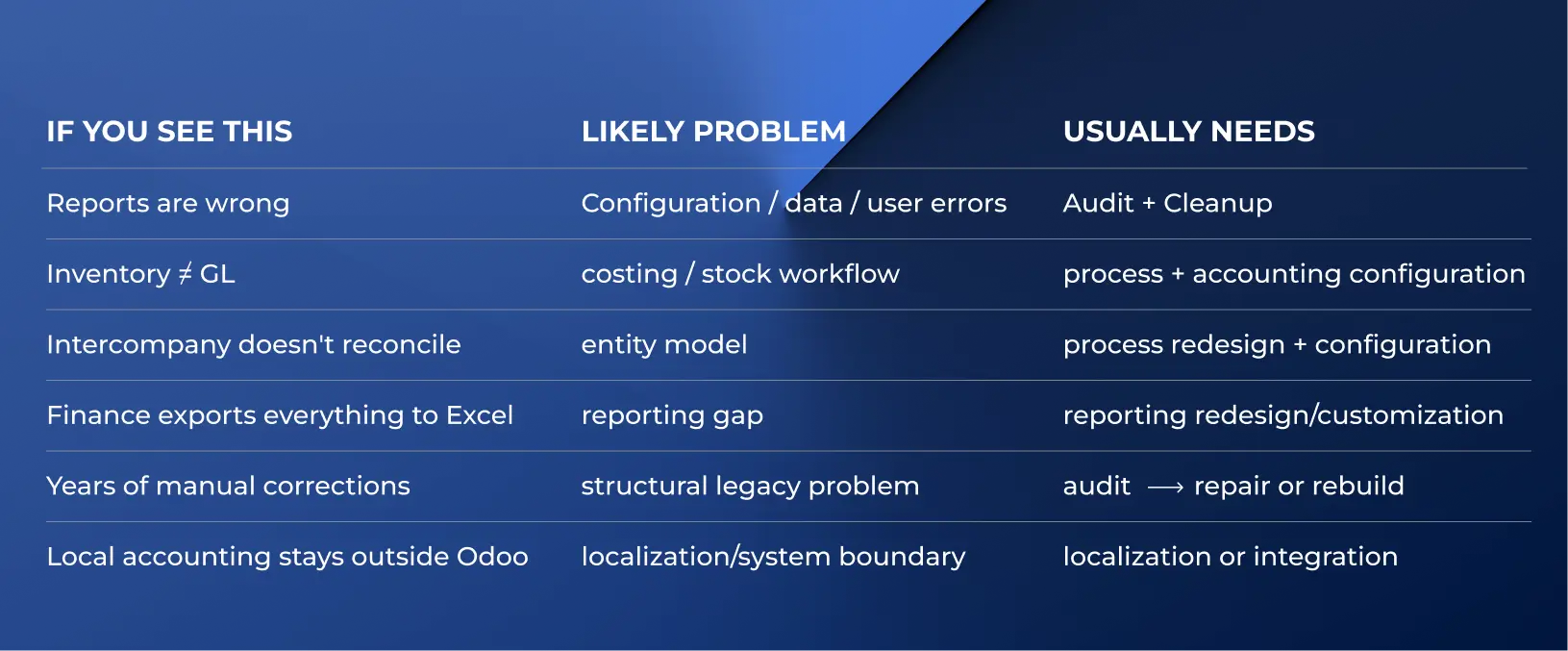
1. Accounting Setup Doesn’t Match How the Business Actually Works
Odoo can’t produce accurate results if you don’t set it up correctly during Odoo accounting implementation. It can only execute what you tell it to do. It also can’t distinguish the right configuration from the wrong one since it can’t know how your business actually operates.
Misconfigurations can hide in many places. For example:
- Flawed account mappings mean transactions get recorded under wrong accounts.
- Incorrect product/category accounts impact costing methods, inventory valuations, warehouse removal strategies, and tax classification rules.
- Improperly configured fiscal positions, like misconfigured country/region settings, can lead to misapplied taxes.
- Inconsistent reconciliation logic can create transaction duplicates or missing transactions.
These misconfigurations don’t mean Odoo doesn’t function as intended under the hood. Yet, the system will still produce unreliable reports, since the input data for them becomes flawed.
Important! Human error is often the source of these mistakes — and the Odoo accounting challenges they cause. So, invest in user training and education. As one study confirms, user training leads to higher ERP adoption rates, increased efficiency, and significantly reduced errors.
SmartTek’s step-by-step solution:
- Add sample transactions and trace them through accounts, taxes, and fiscal positions.
- Compare actual postings against the expected accounting treatment.
- When you spot an incorrect entry, identify the root cause and fix the underlying mapping or configuration issue. Then (and only then), clean up affected historical entries.
- Prevent human error by restricting user choices and/or retraining users where necessary.
- Run the same sample transactions to validate the fix.
2. Operational Workflows Feed the Wrong Data into Accounting
If accounting doesn’t receive accurate data from other functions — sales, purchasing, inventory, invoicing, manufacturing — no amount of accounting reconfiguration will fix errors. You’d only be treating symptoms, not the disease itself.
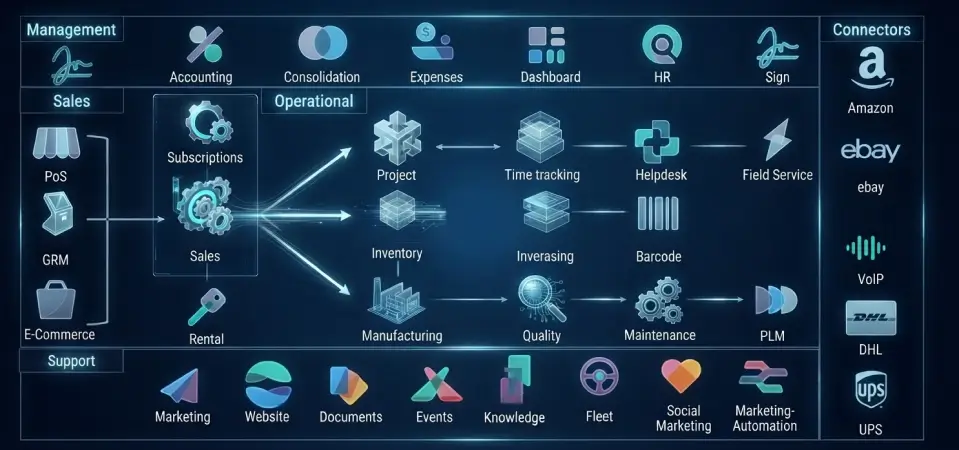
Source: Odoo support, sales, operational, management components and connectors, Railway
Here’s a primer on how data moves through Odoo modules: Purchase → inventory → costing → manufacturing → delivery → invoice → COGS → reporting
And here’s how common Odoo accounting problems can spawn in other parts of the workflow:
- Inventory valuation. If you switch from manual to automated valuation, some entries will be missing, leaving you wondering why Odoo accounting reports are wrong.
- Costing. Similarly, switching costing methods post-rollout may create inconsistencies in Odoo inventory accounting. Using the wrong method (e.g., Standard Price instead of AVCO) will make the valuation drift away from what you actually paid.
- Stock movements. Correcting the stock outside Odoo (e.g., by directly editing the database) causes the quantity and value to fall out of sync.
- Purchasing. If your procurement team enters PO values manually, lack of validation can let a typo slip and wreak havoc.
- BOM consumption. If materials don’t get consumed as expected after you complete a work order, expect discrepancies in inventory and its valuation.
SmartTek’s experience: A North American armored vehicle manufacturer turned to us with cost calculation discrepancies and journal entry inconsistencies. We started with a comprehensive process audit to pinpoint their root causes. To fix them, we structured accounting workflows, developed custom inventory reports, and linked production and inventory systems.
SmartTek’s step-by-step solution:
- Pinpoint the incorrect entry or figure and trace it back to the source transaction.
- Check inventory valuation, costing, stock moves, BOMs, landed costs, and purchasing.
- Fix the root cause in the operational workflow before correcting accounting outputs.
- Re-run the full transaction flow after changes and verify stock valuation, journal entries, COGS, and margins.
3. Multiple Legal Entities Have to Share One Financial Model
Odoo is built with multi-company support in mind, as well as support for parent companies and branches. But as well-rounded as its multi-company toolkit is, that doesn’t mean you can pay no mind to Odoo multi-company accounting. It will always be a complex affair that requires special attention.
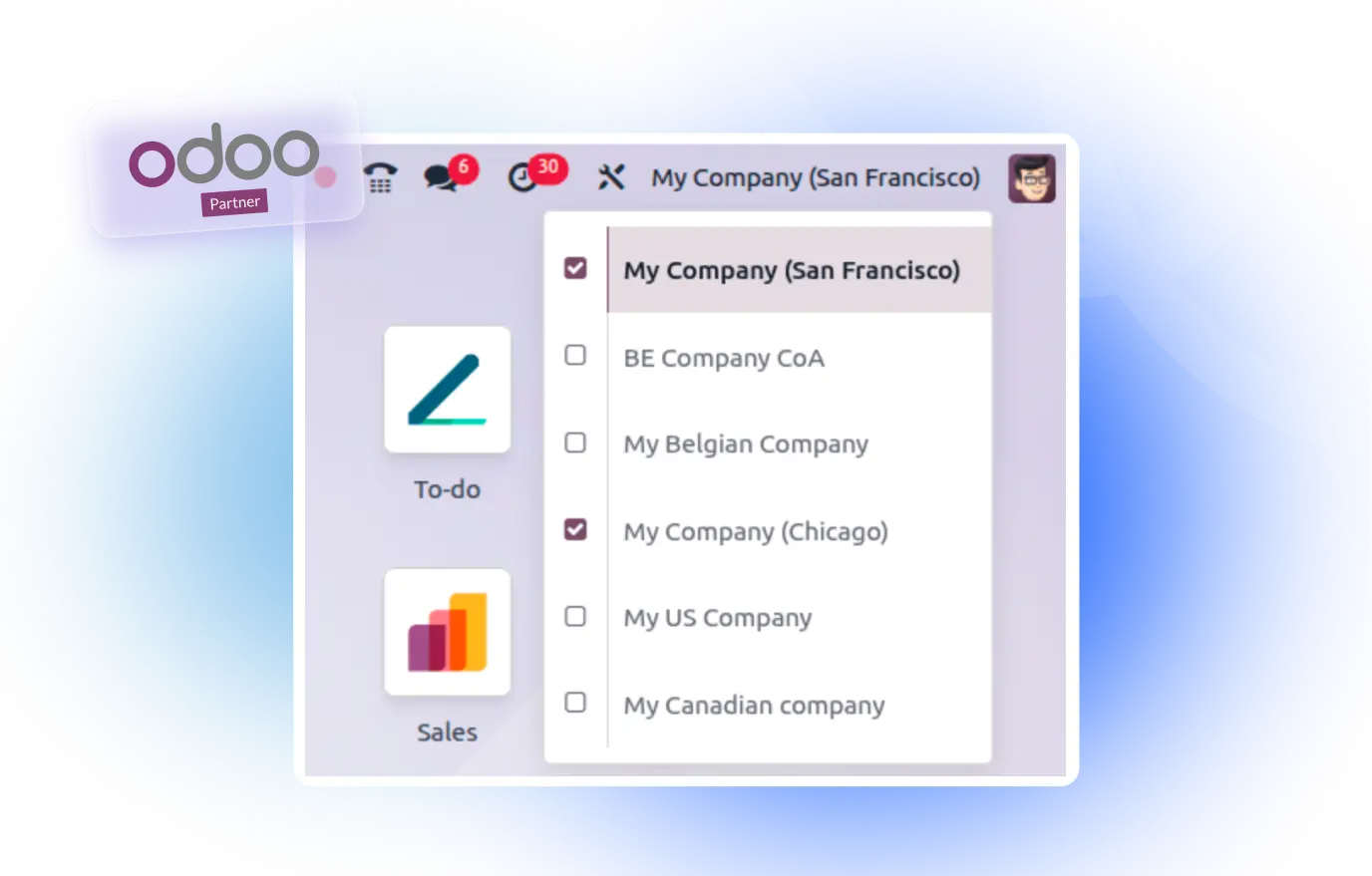
Source: Odoo Documentation, Example of a multi-company setup in Odoo accounting
That’s because you have to:
- Define which entity owns which inventory
- Correctly assign the seller and buyer roles and set the right accounting rules (e.g., fiscal positions, localization) for intercompany transactions
- Recognize revenue and costs within the right entity’s books
- Decide which records to restrict to a company and which ones to share
- Restrict user access (e.g., so that your teams can’t create a sales order in company A and add products belonging to company B to it by mistake)
- Sort transactions in a shared bank account into the right ledgers for individual entities
SmartTek’s experience: A multi-state U.S. lumber retailer, which was running multiple legal entities under one holding group, wanted to replace four disconnected systems with Odoo. We made it happen. The retailer kept using a shared bank account for all locations. We set up separate books and balances for each location to bring clarity into accounting.
SmartTek’s step-by-step solution:
- Define which entity buys, owns inventory, sells, and invoices during Odoo multi-company accounting setup.
- Outline and document intercompany sale/purchase and account logic.
- Set ownership and revenue/cost recognition rules.
- Configure Odoo — but only after stakeholders approve the entity model.
- Test the new configurations on a representative sample of intercompany transactions.
- Reconcile both sides and validate company-level reporting.
4. Accounting Rules Change Across Countries or Jurisdictions
If you operate in several jurisdictions with their own distinct accounting rules, you may need Odoo accounting localization. Luckily, Odoo supports 100+ jurisdiction-specific standards out of the box. For example:
| Country | Odoo’s localization package features |
| United States | GAAP-compliant accounting, FASB/SEC-compliant financial statements, AvaTax integration for state-specific taxes |
| United Kingdom | Making Tax Digital (MTD) rules, Bacs files |
| Germany | Accounting entry export to DATEV |
| Switzerland | Compliant payment slips, localized version of the ISO 20022 format, SEPA PAIN versions |
| New Zealand | Goods and Services Tax (GST) rates and reports |
| The Netherlands | SBR electronic reporting |
Odoo accounting localization by country impacts:
- Taxes (tax rates, exemptions, etc.)
- Fiscal positions (e.g., automated tax adjustments based on customer or supplier status)
- Available transaction currencies
- Statutory reporting (Odoo can either generate compliant reports or also automatically send them to the authorities)
- E-invoicing as per local requirements (local certificate support, invoice emission)
SmartTek’s experience: A textile wholesaler with legal entities in Hong Kong and the United States needed a proper multi-company setup. We implemented one with invoicing, reconciliation, receivables, payables, and reporting. The company’s Odoo can now properly handle intercompany transactions — and automatically adds freight, tariffs, and duties to the landed shipment cost.
SmartTek’s step-by-step solution:
- Map local tax, fiscal, reporting, and invoicing requirements across jurisdictions.
- Check what standard Odoo localization already covers (e.g., e-invoicing, automated tax reporting).
- Configure company-specific taxes, accounts, and fiscal positions.
- Involve local accounting specialists if you lack jurisdiction-specific expertise.
- Integrate a local system where replacing it isn’t viable (e.g., DATEV in Germany, AvaTax in the U.S.).
- Test and validate real local transaction scenarios before go-live.
5. Standard Financial Reporting Doesn’t Match Management Reporting
Standard Odoo accounting reports can cover most — but not all — businesses’ needs. So, you might find yourself in a situation where Odoo produces great general reports, but your teams still spend tons of time putting together custom ones that reflect:
- Profitability by customer, product, or vendor
- Debtor exposure calculated based on company-specific logic
- Margins including landed costs
- Financial results by location or entity
- Cross-functional KPIs
In this case, you need Odoo custom financial reporting.
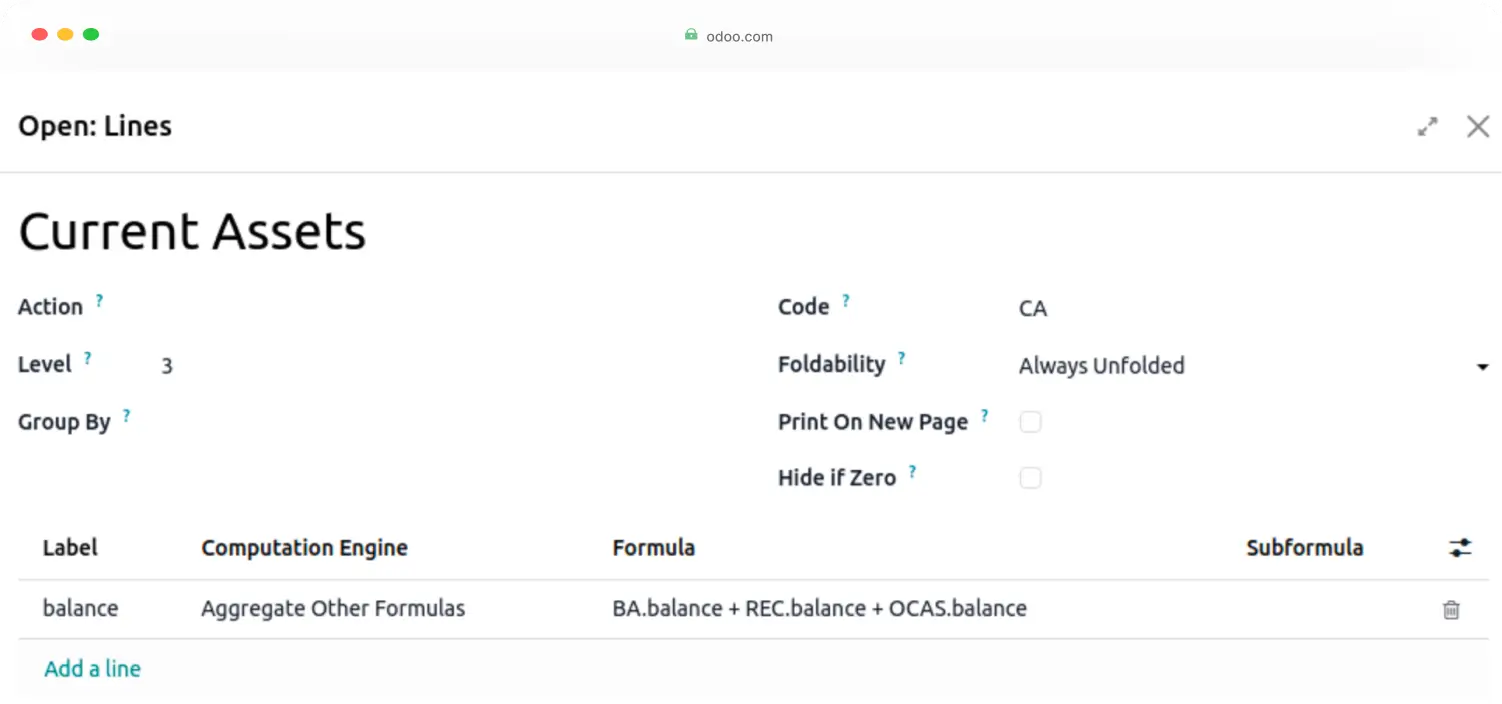
Source: Odoo Documentation, The interface for creating a custom report in Odoo 19
SmartTek’s experience: A UK packaging wholesaler needed an ERP with a custom debtor and invoice dashboard. After 100+ hours of consultation, development, and testing, we delivered the Odoo-based dashboard that offers an at-a-glance overview of invoices, credits, and payments.
SmartTek’s step-by-step solution:
- Define the exact KPIs or reporting logic the management and/or teams need.
- Pinpoint which Odoo data and models will feed the report(s).
- Check whether standard reporting already covers your requirements.
- Identify and fix missing or inconsistent source data before building a report.
- Customize reports if necessary — but only if reporting logic is actually missing.
- Reconcile the final report with underlying accounting records to validate its accuracy.
6. Existing Accounting Environment Has Accumulated Too Much History
Historical data isn’t inherently bad; in fact, it’s extremely valuable. The problem starts when you spend years letting inconsistencies slide, accumulating workarounds, or overlooking bank reconciliation.
Common mistakes include:
- Incorrect opening balances
- Inconsistent inventory valuation or costing methods or records
- Unreconciled entries Incorrect account and tax mappings
- Obsolete workflows
- Overcustomization
- Undocumented workarounds
- Not reviewing configuration after the business structure changes
Some companies make the mistake of blindly importing all historical data during Odoo accounting migration, without data cleansing or validation. Others do their due diligence at the outset but accumulate errors over years of using Odoo without proper oversight.
SmartTek’s experience: The US-Hong Kong textile wholesaler we’ve already mentioned was also struggling with an outdated, heavily customized Odoo install. After a comprehensive system audit, we suggested moving on to a clean setup; years of workarounds made the existing setup hard to salvage. Proceeding with a clean setup enabled us to normalize 10 TB of product data and ensure supply chain visibility.
SmartTek’s step-by-step solution:
- Reconcile opening balances, receivables and payables, bank transactions, taxes, and inventory valuation.
- Determine which are isolated data errors and which stem from structural problems (For isolated errors: Clean data and reconfigure settings. For structural problems: Choose between repairing the install and starting over).
- Transfer validated balances and open items; do not blindly migrate everything.
- Reconcile the new setup before cutover.
7. Odoo Has to Coexist with Other Financial Systems
Other systems can be a lot better suited — or even necessary — for handling highly specialized tasks like:
- Local or statutory accounting
- Payroll
- Expense management
- Tax management
- Payment management
In that case, you can forego Odoo accounting and integrate Odoo with local accounting software.
However, if your Odoo install has to coexist with other systems, overlooking Odoo accounting integration can create data discrepancies across them.
SmartTek’s experience: Ventmann, a Lithuanian HVAC manufacturer, wanted to preserve its local accounting system while centralizing reporting, inventory, and payments in a single ERP. We helped the company implement Odoo Manufacturing, Purchase, and Sales modules. The accounting system pushes financial data to Odoo through an API integration to keep everything in sync.
SmartTek’s step-by-step solution:
- Define which system owns each process and dataset.
- Establish a clear source of truth for accounting, payroll, expenses, etc.
- Define what data moves, in which direction, and when.
- Set matching, reconciliation, and sync-failure rules.
- Use standard integrations first; build custom API logic only when it’s an absolute must.
- Test end-to-end business flows, not just API connectivity, to catch integration issues.
Does Your Odoo Accounting Need a Fix, Customization, Integration, or Rebuild?
So, you’ve encountered Odoo inventory accounting problems. “Fix or rebuild?”, you might be wondering. Here’s our decision framework for common scenarios:
| Solution | Scenario |
| Configure / retrain teams | Out-of-the-box Odoo capabilities meet your needs; the root cause lies in misconfigured mappings, fiscal positions, or improper system use |
| Customize | Overall, accounting meets your needs, but specific management reporting or business logic isn’t covered out of the box |
| Integrate | Part of accounting or financial management has to reside in a separate system |
| Repair | Accounting architecture is overall good, but you’ve accumulated isolated error or data issues over the years |
| Rebuild | The foundational accounting model, opening balances, workflows, and customizations are so difficult to untangle that repairing becomes too expensive or risky |
What It Takes to Solve an Odoo Accounting Problem
When you have different products with different rules, fiscal positions, and chargebacks, hunting down the exact origin of an accounting problem is no cakewalk. The same rings true if you operate in multiple locations and your entities trade with each other.
In such cases, being an expert in Odoo accounting implementation best practices is not enough. You’ll also need expertise in:
- Accounting practices
- Odoo configuration across modules
- Business analysis
- Your business processes and operations — and how they impact accounting Odoo development and integration (e.g., for customized reporting or local accounting system integration)
- Jurisdiction-specific legal requirements and accounting practices where needed
Conclusion
Odoo Accounting is a powerful module, but that’s exactly why its setup can get complicated fast. So, take time to make sure the accounting setup actually reflects your business and gets accurate historical and real-time data.
SmartTek can help you hunt down and eliminate the origin of your accounting problems — or migrate to Odoo without risking them in the first place. Drop us a line to discuss your accounting needs in detail.
Frequently asked questions
Can Odoo Accounting be used out of the box, or does it require additional configuration?
Defaults can meet simple accounting needs, but you should verify them anyway. That said, most businesses need to configure the chart of accounts, set financial positions, or switch inventory valuation methods.
Can Odoo handle accounting for multiple companies and intercompany transactions?
Yes. Odoo multi-company accounting is available out of the box, and the ERP can support setups with parent companies and branches. You can also add intercompany transactions.
Why doesn’t Odoo inventory valuation match the accounting records?
Manual inventory adjustments or unbilled receipts can lead to inventory valuation discrepancies. Picking an incorrect costing method can also be to blame.
How do you migrate opening balances and accounting data into Odoo?
Clean up legacy data, reconcile accounts, and map the chart of accounts. Then, export data in a compatible format and import opening balances, customers, vendors, and invoices into Odoo. Validate the imported data and reconcile entries post-migration.
Should you migrate all historical accounting data to Odoo or start with opening balances?
Both are technically possible. Migrating only opening balances helps you start fresh and avoid inconsistencies. Migrating all data, in turn, offers better insights into historical trends.
Can Odoo replace QuickBooks, Xero, or another accounting system?
Yes, but remember: Odoo is an ERP, not just an accounting system. While it has a wide range of accounting capabilities (multi-company accounting, AVCO/FIFO, etc.), it’s designed to centralize it alongside manufacturing, purchasing, sales, etc.
Can Odoo work alongside an existing accounting system instead of replacing it?
Yes. Instead of installing the Odoo Accounting module, you can integrate the ERP with an external accounting system using APIs.
Why does the bank balance in Odoo sometimes differ from the General Ledger?
You can see a discrepancy there if you manually added transactions that don’t show up on a bank statement to a journal entry. Exceptions like unusual write-offs, unidentified deposits, and disputed amounts can also create problems.

 view the post